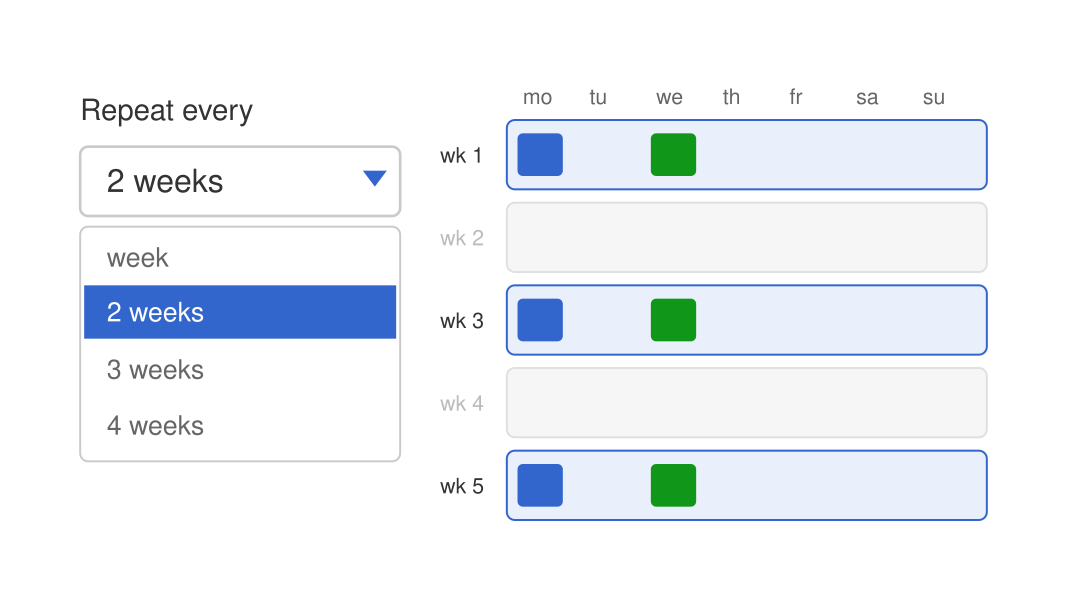
Recurring shifts: repeat every week or every 2, 3 or 4 weeks
Bericht: Update
Geplaatst: 14-07-2026
With the form Management → Add recurring shifts you add a whole series of shifts to the calendar in one go. New: you now decide how many weeks apart the shifts repeat.
What's new?
- In step 2, next to the days you now also choose Repeat every: week, 2 weeks, 3 weeks or 4 weeks.
- The weeks are counted from the week of the start date.
- The number of shifts to be added updates live in the form, also when you change the period, the days or the repeat interval.
- The "Double shift!" warning on the overview page now also checks shifts that are already in the roster for the selected person.
What's in it for you?
Does your team work with a schedule that alternates every other week or every few weeks? Then you no longer need to add separate periods or remove shifts afterwards. Set it once and the roster is right straight away.
Tags: #shiftplanner, #shifts, #recurring, #roster
Does your team work with a schedule that alternates every other week or every few weeks? Then you no longer need to add separate periods or remove shifts afterwards. Set it once and the roster is right straight away.